
Find the right experience
Open Cameraman Tower Defense on Roblox, created by Aligators Games, Place 132929771812494. The official description identifies match platforms, camera-headed defenders and incoming toilet waves. A similarly named Roblox game may have completely different codes, currencies or units.
This walkthrough uses October 2026 interface reports. Labels can move after an update; match the purpose of the control as well as its name.
Prepare a loadout
Open Units in the lobby and equip defenders you already own. VendoPlus’s October 10 beginner recording describes equipping units before entering the platform. Do not assume a unit is equipped just because it appears in your inventory.
Choose something you can afford to place early. An expensive carry that remains unplaced while enemies pass is not a complete opening plan. If you own Ninja Cameraman, the later Insane review describes it as a cheap opener; that is an option, not a prerequisite for a first match. Check the unit reference to distinguish cheap damage, a farm and an expensive carry.
The October 12 acquisition guide reports Basic Crate summons at 100 Coins for one or 900 for ten. Its visible lineup rotates. Look at the current slot and timer before spending for a specific unit; a guide’s old inventory is not today’s crate lineup.
Start a match
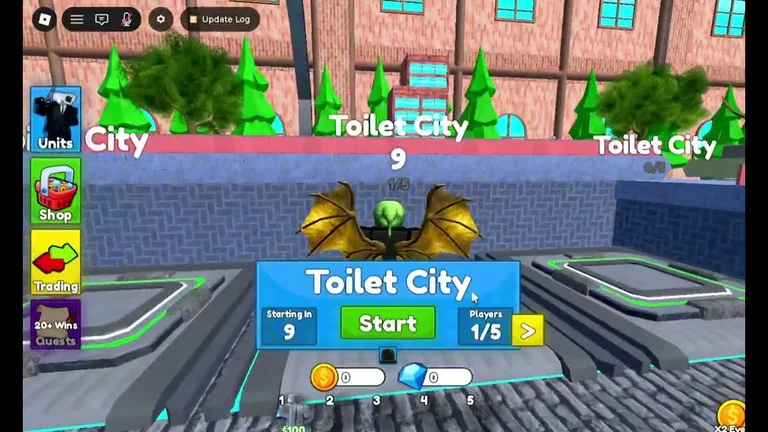
- Locate a match platform in the lobby. The supplied beginner recording at 1:21 uses Toilet City.
- Enter the platform and use its Start control. Check the map, party and difficulty shown before committing.
- For a first attempt, choose the lowest available difficulty to learn the controls and path. This is a learning recommendation, not a claim that it produces the best farming rate.
- Once in the match, identify the enemy path, base health and cash balance before placing a unit. The run’s cash is the budget for your defense; lobby Coins serve a different purpose.
Place and upgrade
Select an equipped unit and preview a legal placement beside the path. SuperCheats’s placement tips describe a white range circle and R to rotate on keyboard. Judge how much of the path is actually inside the circle. A corner or a position reaching two stretches can give a unit more time to attack.
After placing, select the unit to inspect its upgrade cost and resulting damage or range. The beginner recording shows this placement-to-upgrade sequence. Spend on enough early coverage to stop leaks, then improve a useful defender. A cash farm does not replace damage; Scientist Cameraman and Popcorn Cameraman are economic roles.
Avoid enabling faster wave flow just because a guide does. If the previous enemies are still alive when another wave arrives, overlapping them can overwhelm an otherwise workable defense. The late-wave decision guide explains why Auto Skip depends on remaining damage and coverage.
Read the result and return
Keep defending until the game presents its win or loss result. A damaged base does not automatically mean the run is already lost; watch its remaining health. Use the result screen to distinguish a completed win from a run you abandoned, and check the rewards actually credited before budgeting another summon.
Return through the game’s displayed lobby or replay control. Do not rely on /lobby: in the supplied beginner transcript, the creator tries it without a working result. A replay control is also described in the supplied October 10 update overview; follow the current screen if its layout differs.
For the next run, change the cause of failure:
Scroll the table horizontally to see all columns →
| What went wrong | Next adjustment |
|---|---|
| Enemies passed before you built damage | Equip an affordable opener and place it before investing in a farm. |
| Units attacked for only a short stretch | Reposition for longer path coverage, using the range preview. |
| Cash accumulated but damage stayed low | Check affordable upgrades on the defenders already covering the path. |
| Late waves overlapped and broke the defense | Slow the wave flow and use the Insane strategy’s diagnosis. |
What to read after your first wins
At three wins, check the reported codes and redemption steps. At 20 wins, the cited acquisition guide reports the quest route for gems. When comparing upgrades, use the dated tier list alongside your actual roster and difficulty.
Sources and limits
This is a guided reading of the official game identity, the linked VendoPlus walkthrough, SuperCheats’s control description and Vaulted Values X’s October 12 match review. Selected original-player frames were inspected, including VendoPlus’s placed-unit range circle and upgrade panel at 2:10. Instructions retain the recordings’ dates; this wiki has not completed a live first match or confirmed the current patch through gameplay.